Developer Documentation
Introduction
This snakes and ladders game has been developed as part of Software Engineeirng course in MIS program as team. We formed an agile team of four members will be introduced in following section. while working on this project we strictly followed Agile Software Development process with the supervision of Michael Grossberg, professor department of Computer Science, CCNY.
Team
- Thurain Nyunt (Product Owner)
- Md Eakub (Scrum Master)
- Apup Datta (Developer)
- Richard Black (Developer)
Developers Welcome to Snakes and Ladders Game Documentation
In this section you will find all the fetures we deverloped explained in detail.
As we all know about the ancient snakes and ladders board game, it has some common feaures like scored grided board, snakes and ladders etc.
Table of Contents
- Developers Giude
- 1.1 Notes for Developers
- 1.2 Contribution
- 1.3 Coding Standard
- 1.4 Development Policy
- 1.5 Online Repository
- 1.6 Version Controll Tools
- 1.7 Game Features
- 1.8 How it works
- 1.9 Diagrams
- 1.10 Library
- 1.11 Unit Tests
- 1.12 Acceptence Tests
- 1.13 Release
1.1 Notes for Developers
This documentation is solely devoted to the internal developers. Here we are not exposing any API to external developers. External developers can read the documents for their own benifits but any sort of illegal attempt of modifying or corrupting this document will be subject to the copy right law.
1.2 Contribution
All team members contributed in this project based on their roles. Even though as it is a educational project coding for everyone was an absolute must. So apart from team’s role every one participated in coding as well.
1.3 Coding Standard
We followed test driven development (TDD) process while working in this project. In order to maintain best code quality we evaluated our code using Pylint and good news is we scored more than 9.5 out of 10.
1.4 Development Policy
This is a educational project. Any one interested to contribute in this project is welcome after our final presentation.
1.5 Online Repository
Bitbucket - Online Code Hosting. This is what we used to keep our code online. We maintained a master repository and team has read access to master repository. Team forked the master repository to make their own repository and commit their tasks. Then team create pull request to master repository and scrum master was responsible to verify and merge codes done by team.
1.6 Version Controll Tools
In this project in order to maintain our code history and maintain work process in a best way we used mercurial version control method.
1.7 Game Features
- User Registration
This features facilitiates players to register before game start. It takes players name and save it in sqlite database along with an unique ID.
- Game Setup
According to the ID of the players this features will setup the game sequence. Which will decide which player will go first. The sequence initially setup will be maintained until a winner is found. Based on this sequence player will switch their turn.
- Throwing Dice
This is the feature which will help players to throw dice and get the score. Here instead of real dice behind the scene we used math random munber generator function.
- Board
The most important feature of this game is 10x10 grided board. While game will be progressing, all players score will be spotted on the baord using their unique indetifier.
- Snakes
Snake is another important feature in this game which makes the game more exciting. As part of this feature we maintained some snakes and spotted them on board using the character ‘S’. If any player score any value which is the head of any snakes the corresponding player’s score will go down to the score where the tail of the current snake is located. For better user expirience we display available snakes just on top of the board.
- Ladders
Ladder is also very important feature in this game which make the game more fun. In this feature we maintained some ladders and also spotted them on board using the character ‘L’. If any player score where any ladder start then the corresponding players score will be increased to the score where the current ladder’s top is. As we had complication displaying ladders graphically on text based board, for better user experience we are displaying available ladders on top of the board.
1.8 How it works
Following the rules need to maintain while playing the game ..
- Game start with first player by throwing dice
- Each player will thorw dice in turn
- Once any player score one for the first time, score accumulation starts.
- There will be snakes and ladders, if any player socre snakes/ladders corresponding player’s score will be increased/decreased acccordingly.
- Continue above steps untill any player score 100 and declared as winner.
- Once a winner is announced all players information will be saved in archive table for future record
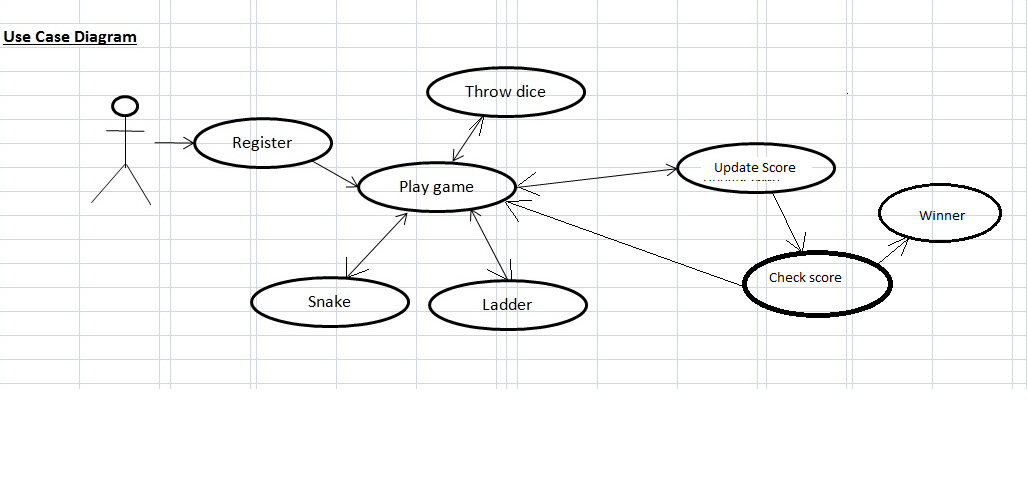
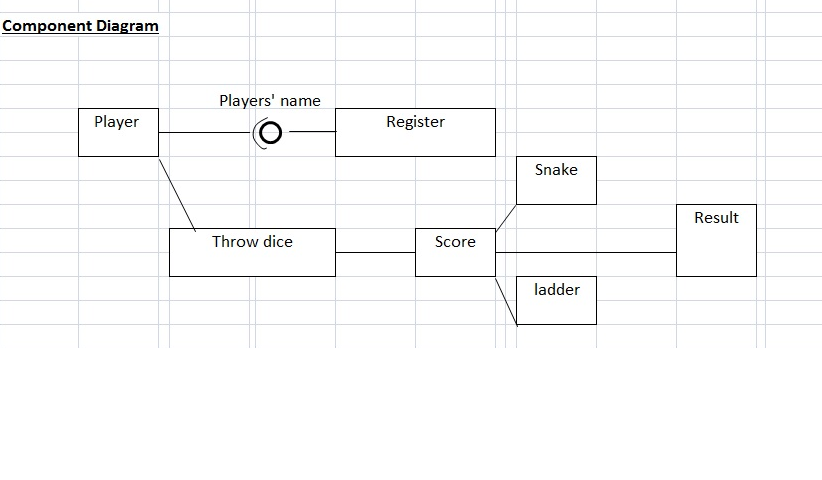
1.9 Diagrams
Following are some diagrams of Snakes and Ladders game
Use Case Diagram
Component Diagram
Class Diagram

1.10 Library
We developed library for this project consists of pretty much all functionality. Following are the functions included in DiceLib.py
In order to run this game you need to import dice library as follows:
import DiceLibCreate Table in database
The first function should be called is createtable() looks as follows which will create required table in sqlite3 database where we store players information
import DiceLib
DiceLib.createtable()
Register User
Use the addmanyuser(user) function to register user at the begining of the game. You can call the function as follows:
import DiceLib
user = [('sumon', 0), ('mohammed', 0), ('jannatun', 0)]
DiceLib.addmanyuser(user)
Using this function you can register more than one players at a time. You can find DiceLib.adduser() function which can be called for registering only one player at a time.
Definition of the addmanyuser(user) function looks as follows:
def addmanyuser(user):
  """
  :users:[] dictionary of user(name,score)
  this function will insert multiple user together
  """
  c.executemany('''INSERT INTO players(name,score)
               VALUES(?,?)''', user)
  return True
Game Start
While start playing first function should be called is getalluser() which will display all the players with initial score of zero. You can call this function as follows:
def getalluser():
  """
  this method will print all the players information registered
  for this session
  """

  c.execute('SELECT * FROM players ORDER BY 1')
  for i in c:
      print "\n"
      print "Player " + str(i[0]) + ":" + str(i[1]) + ":" + str(i[2])
This function will fetch all registered players information from database.
Display the Board
Call this display_snakes_and_ladders() function to display snakes and ladders. It will print snakes and ladders and the function looks as follows:
def display_snakes_and_ladders():
  """
  display snakes and ladders
  """
  cprint("\nLadders: ", 'red')
  PRINT_RED_ON_BLUE(LIST_OF_LADDERS)
  cprint("\nSnakes: ", 'red')
  PRINT_RED_ON_BLUE(LIST_OF_SNAKES)
  print "\n"
Next call the function display_board() which will print the initial state board. This function looks like
def display_board():
  """
  this function will display dice board along with player's score
  :return:will display board
  """
  num_cols = 10
  num_rows = 10
  cell_index = num_cols * num_rows
  is_row_reverse = 0

  for row in range(0, num_rows):
      col_index = 0
      row = []
      row_str = "       | "

      while col_index < num_cols:
          row.append(cell_index)
          col_index += 1
          cell_index -= 1

      if is_row_reverse == 1:
          row.reverse()
          is_row_reverse = 0

          ... ... ... code skipped

  print row_str
  print "       | " + "-" * 57 + " | "
This is a quite big function that’s why we aren’t including the whole code in document. For detail you have to look into the original code file.
Game Control
Call main play_game(total) function which expect total number of players currently going to play. Based on the total number of players it will configure the turn and continue the game. play_game(total) function look as follows:
def play_game(total):
  """
  Main method to control game and turn among all registered players
  :param total:
  :return control game and once have winner exit
  """
  proceed = True
  while proceed:
      for i in range(0, total):

          current_player = getusernamebyid(i+1).title()

          raw_input("\n" + current_player + " it's your turn, "
                                            "please hit enter \n")

          score = throw_dice()
          current_score = getuserscorebyid(i+1)

          print "You scored : " + str(score)
          print "Previous score: " + str(current_score)

          if current_score > 0:
              current_score = update_player_score(i + 1, score, '+')
          else:
              if score == 1:
                  current_score = update_player_score(i + 1, score, '+')

          if str(current_score) in LIST_OF_SNAKES.keys():
              score = int(LIST_OF_SNAKES[str(current_score)])
              print ("OMG !!! it's snake @ " + str(current_score) \
                    + " and tail is @ " + str(score), 'red')
              current_score = update_player_score(i + 1, score, 's')

          elif str(current_score) in LIST_OF_LADDERS.keys():
              score = int(LIST_OF_LADDERS[str(current_score)])
              print ("YES!!! Ladder @ " + str(current_score) \
                    + "  and top of the ladder @ " + str(score), 'green')
              current_score = update_player_score(i + 1, score, 'l')

          if int(current_score) == 100:
              proceed = False
              PRINT_RED_ON_GREEN(current_player + " You win !!!!")
              display_board()
              break
          elif int(current_score) > 100:
              current_score = update_player_score(i + 1, score, '-')
              print current_player + " your total > 100, deducting current" \
                                     " points :" + str(current_score)

          print current_player + " your current score is :" \
                + str(current_score)

          display_snakes_and_ladders()

          display_board()
These are the following functions will called iteratively from main play_game(total) function till the game ends and we find winner.
current_player = getusernamebyid(i+1).title()Above shows that how we get current player’s name in title case.
Update Score
current_score = update_player_score(i + 1, score, '+')Above function update_player_score(player_id, val, operator) update the score depending on the operator +/-. It also takes the player id as input parameter and number obtained in this throw as val.
Check for Snakes or Ladders
Then following code snippet check whether current score hold any snake or ladder. Depending on snake or ladder it agiain adjust the score.
if str(current_score) in LIST_OF_SNAKES.keys():
    score = int(LIST_OF_SNAKES[str(current_score)])
    print ("OMG !!! it's snake @ " + str(current_score) \
          + " and tail is @ " + str(score), 'red')
    current_score = update_player_score(i + 1, score, 's')

elif str(current_score) in LIST_OF_LADDERS.keys():
    score = int(LIST_OF_LADDERS[str(current_score)])
    print ("YES!!! Ladder @ " + str(current_score) \
          + "  and top of the ladder @ " + str(score), 'green')
    current_score = update_player_score(i + 1, score, 'l')
Find Winner
In order to declare current player winner we use the following code snippet.
if int(current_score) == 100:
  proceed = False
  PRINT_RED_ON_GREEN(current_player + " You win !!!!")
  display_board()
  break
At the same time we display the updated board.
Archive
Once we find the winner immediately control come out of the play_game(total_number_of_players). Then immediately we call saveuserstoarchive() function looks as follows:
def saveuserstoarchive():
  """
  this function will save current session players to archive table
  for feature reference
  :return:
  """

  val = get_max_session_id()
  if str(val[0]).isdigit():
      flag = val[0] + 1
  else:
      flag = 1

  cursor = c.execute('SELECT * FROM players ORDER BY 1')
  data = cursor.fetchall()
  for i in data:
      c.execute('''INSERT INTO archive(session_id, player_id, name, score)
                   VALUES(?,?,?,?)''', (flag, i[0], i[1], i[2]))
  return True
1.11 Unit Tests
During this project we followed Test Driven Development(TDD) and achieve almost 80% test coverage.
Following are the tests written while working on this project.
def test_add_many_user(self):
    DiceLib.createtable()
    user = [('sumon', 0), ('mohammed', 0), ('jannatun', 0)]
    self.assertTrue(DiceLib.addmanyuser(user))

def test_get_total_player_count(self):
    self.assertEqual(3, DiceLib.get_total_player_count())

def test_throw_dice(self):
    num = DiceLib.throw_dice()
    self.assertTrue(num in self.seq)

def test_get_player_score_by_id(self):
    pass

def test_get_player_name_by_id(self):
    self.assertEqual('sumon', str(DiceLib.getusernamebyid(1)))

def test_get_player_by_name(self):
    self.assertEqual('sumon', str(DiceLib.getuserbyname('sumon')))

def test_add_all_current_session_players_to_archive(self):
    self.assertTrue(DiceLib.saveuserstoarchive())

def test_user_add(self):
    self.assertTrue(DiceLib.adduser('Maxim'))
1.12 Acceptence Tests
As part of acceptence test product owner ensured that all the promised feautres of the game has been develped and accepted the project.
1.13 Release
After successfull project demonstration we released version 0.1 of Snakes and Ladders game to production.